Lytta: A Bold Display Font for Web Design
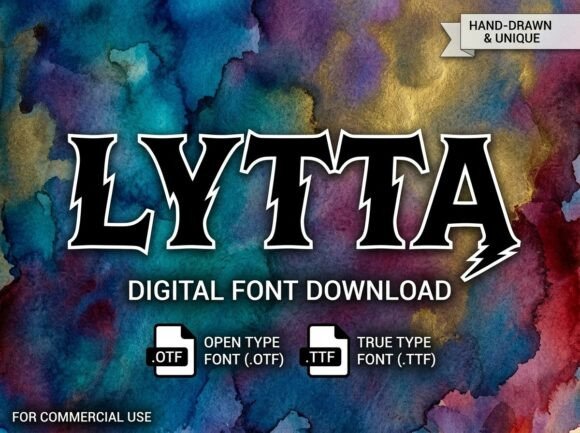
Testing Lytta in a hero section of a boutique online store, I was immediately drawn to its bold, artistic presence. As a web designer, I often look for fonts that can command attention without overwhelming the user. Lytta fits that need perfectly, offering a decorative display font with strong character that stands out on any layout.
Lytta for Creative Portfolio Websites and Branding
Lytta is ideal for creative portfolio websites where visual impact matters. Its unique strokes and intricate details make it a standout choice for project titles, client logos, and brand headers. When paired with a clean sans serif for body text, it creates a balanced and professional look that feels modern and intentional.
Using Lytta in a portfolio header adds an air of sophistication. It’s especially effective when used over background images or gradients, as the font’s contrast helps it pop without clashing. For a digital product creator, this means more flexibility in designing eye-catching layouts that reflect their brand’s personality.
Lytta for Online Store Banners and Product Headlines
In an e-commerce setting, Lytta shines as a display font for product headlines and banner text. Its artistic elements bring energy to promotional content, making it perfect for seasonal campaigns or limited-edition collections. When used on a landing page, it can guide users’ eyes toward key messages like “New Arrivals” or “Limited Time Offer.”
However, it’s important to consider readability. On smaller screens or mobile devices, the font’s complexity can become hard to read if not used sparingly. That’s why I tend to reserve Lytta for larger headings rather than body copy. It works best when it’s the focal point, not the background noise.
Lytta for Coaching Websites and Digital Course Pages
For a coaching website, Lytta offers a way to elevate the tone of a landing page or course sales page. Its strong character aligns well with the professional yet creative vibe of many online learning platforms. Using it in a headline like “Transform Your Mindset” or “Start Your Journey Today” adds a sense of authority and inspiration.
I’ve also found that Lytta pairs well with subtle animations or hover effects. When combined with a smooth transition, it can create a dynamic experience that keeps users engaged. This makes it a great choice for interactive design elements that support the overall brand identity.
Lytta for Blog Headers and Social Media Graphics
Blogs and social media graphics often require a font that can grab attention quickly. Lytta delivers in both areas, offering a decorative display font that feels both elegant and approachable. Whether it’s a blog title or a social media post, it adds a touch of personality that sets the tone for the content.
When using Lytta in a blog header, I recommend keeping the text short and impactful. Long paragraphs can be difficult to read in this style, so it’s best reserved for titles, subheadings, or call-to-action buttons. This ensures that the font remains a strength rather than a distraction.
Lytta for Landing Pages and Campaign Promotions
Landing pages benefit from a font that can communicate a message clearly and confidently. Lytta does just that, making it a strong candidate for campaign promotions or event announcements. Its boldness helps it stand out against other design elements, ensuring that the main message is never lost.
One challenge with Lytta is maintaining consistency across different screen sizes. I’ve tested it on both desktop and mobile layouts, and while it looks great on larger screens, it requires careful spacing and sizing on smaller ones. This makes it a good fit for hero sections or full-width banners, where there’s more room to breathe.
Lytta for Logo Design and Visual Identity
Logos and visual identities often rely on a font that can represent a brand’s values and aesthetics. Lytta’s artistic elements make it a compelling choice for logo design, especially for brands that want to convey creativity, craftsmanship, or individuality. Its distinct shape and structure give it a memorable quality that can help a brand stand out in a crowded market.
When used in a logo, Lytta works best when paired with a simpler typeface for supporting text. This creates a visual hierarchy that guides the viewer’s eye and reinforces the brand’s message. It’s also worth checking the font’s licensing options to ensure it’s suitable for commercial use, especially if the logo will be used across multiple platforms.
Lytta for Responsive Layouts and Mobile Optimization
Responsive design requires a font that can adapt to different screen sizes without losing its visual appeal. Lytta handles this well, but it’s important to test it in various scenarios. On dark backgrounds, it maintains clarity and contrast, while on light backgrounds, it still retains its artistic flair without appearing washed out.
For mobile optimization, I recommend using Lytta at larger sizes and avoiding it in small text blocks. It works best when it’s the main visual element, such as in a navigation menu or a CTA button. This ensures that it remains legible and accessible to all users, regardless of device or screen size.
Lytta for Font Pairing and Web Typography
Font pairing is essential for creating a cohesive and readable design. Lytta pairs well with a range of other fonts, depending on the desired aesthetic. For a modern, minimalist look, I often pair it with a clean sans serif like Inter or Roboto. For a more editorial feel, a serif font like Playfair Display complements its elegance and sophistication.
When working with clients, I always check the font’s available weights and styles before recommending it. Some decorative display fonts come with limited options, which can restrict design flexibility. Lytta, however, offers enough variation to support different typographic needs, from bold headers to subtle accents.